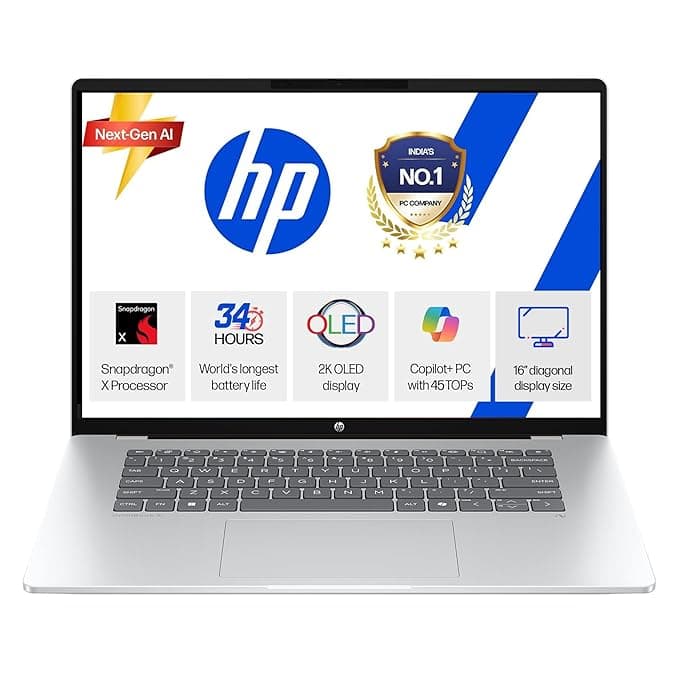
Our HP Omnibook 5 OLED review breaks down this 16-inch Snapdragon X laptop. Discover if the 2K OLED display, 1TB SSD, and AI features make it the best value productivity laptop.
TL;DR
- Who should buy: Professionals and students needing a large, color-accurate screen for productivity and entertainment without the bulk.
- Who should skip: Users relying on niche legacy software that may have ARM compatibility issues, or high-end gamers.
- Standout reason: It pairs a 16-inch 2K OLED display with a 1TB SSD at a very competitive price point under ₹70,000.
- Value note: Rare combination of portability (1.59kg) and screen size for a 16-inch machine.
Introduction
The HP Omnibook 5 OLED (fb0001QU) marks a significant shift in HP’s consumer lineup, moving away from the "Pavilion" branding toward the "Omnibook" name. This isn't just a name change; it represents a pivot toward the Snapdragon X platform. This laptop is designed for those who want the "Next-Gen AI" experience, focusing on efficiency, rapid wake times, and vibrant visuals. In this HP Omnibook 5 OLED review, we will explore how its ARM-based architecture and premium display stack up for the modern mobile user.
What You Get
The HP Omnibook 5 comes in a sleek Glacier Silver finish and weighs a surprisingly light 1.59kg for a 16-inch device. Inside, it features the Snapdragon X X1-26-100 processor (8 cores), 16GB of LPDDR5x RAM, and a spacious 1TB PCIe NVMe SSD. The centerpiece is the 16-inch 2K OLED display. The retail package includes Windows 11 Home, Microsoft Office Home 2024, and a 1-year basic subscription to Microsoft 365.
HP Omnibook 5 Snapdragon X Performance and Features
- Display: 16" 2K (1920 x 1200) OLED panel with a 0.2ms response time and 95% DCI-P3 color gamut coverage.
- Processor: Snapdragon X X1-26-100 with 8 cores reaching up to 2.97 GHz.
- Graphics: Integrated Qualcomm Adreno GPU.
- Connectivity: Features Wi-Fi 6E and Bluetooth 5.3, along with two USB Type-C ports (10Gbps) supporting Power Delivery and DisplayPort.
- Charging: Supports fast charge, reaching approximately 50% battery in 30 minutes.
- Privacy & Security: Includes a physical camera privacy shutter and a dedicated mic mute key.
- Generic Assumption: Given the ARM-based Snapdragon X architecture, users can generally expect improved thermal management and battery efficiency compared to traditional x86 laptops in this weight class.
Pros & Cons
Pros:
- Stunning OLED Visuals: The 95% DCI-P3 color gamut and 0.2ms response time are excellent for media consumption and creative work.
- Massive Storage: 1TB SSD is a generous inclusion at this price point.
- Ultra-Portable for its Size: At 1.59kg, it is significantly lighter than many competing 16-inch laptops.
- Modern Software: Comes pre-loaded with the latest Office 2024 suite.
Cons:
- Brightness Limitations: The 300-nit peak brightness might struggle in direct outdoor sunlight.
- Port Selection: Only one USB Type-A port may require the use of a dongle for those with multiple older peripherals.
- Compatibility: As an ARM-based Windows laptop, some specialized apps or older drivers may require emulation.
Real-World Use
In a typical office or home-office scenario, the 16:10 aspect ratio of the 16-inch screen provides more vertical space for documents and spreadsheets compared to standard 16:9 screens. The HP Omnibook 5 fb0001QU value shines during long work sessions thanks to the Low Blue Light certification on the OLED panel.
For students or remote workers, the lightweight chassis makes it easy to carry between locations, while the fast-charging 59 Wh battery ensures you can quickly top up during a lunch break. The inclusion of a physical privacy shutter on the camera is a practical touch for those frequently on video calls.
How It Compares
The Omnibook 5 stands out in the 16-inch category primarily through its weight and display technology. Most 16-inch laptops at this price point use IPS LCD panels; moving to 16-inch OLED laptop features like true blacks and high contrast is a major upgrade. While the Snapdragon X 8-core processor is built for efficiency rather than raw workstation power, it competes well with mid-range traditional processors for daily multitasking and AI-assisted workflows.
Who Should Buy It / Who Should Avoid It
Buy it if:
- You prioritize screen quality for movies or photo editing.
- You need a large screen but want to keep your backpack light.
- You want the latest "Next-Gen AI" features integrated into Windows 11.
Avoid it if:
- You are a competitive gamer (the Adreno GPU is not designed for triple-A gaming).
- You use highly specific legacy software that is known to have issues with Windows on ARM.
FAQs
Q: Does the HP Omnibook 5 come with a backlit keyboard? A: Yes, it features a full-size, backlit soft grey keyboard.
Q: Is the 1TB storage expandable? A: The laptop comes with a 1TB PCIe NVMe M.2 SSD; while the slot is standard, replacing it would require swapping the existing drive.
Q: Can I use this for video editing? A: The OLED screen is great for color grading, but the 8-core Snapdragon processor is best suited for 1080p or light 4K editing rather than heavy professional rendering.
Q: How fast does the battery charge? A: It supports fast charging, reaching 50% in about 30 minutes using the included power adapter.
Q: Is Microsoft Office included? A: Yes, it comes with MS Office Home 2024 pre-installed.
Verdict
The HP Omnibook 5 OLED is a compelling entry into the new era of ARM-based Windows laptops. By offering a premium 16-inch OLED display and a massive 1TB SSD for ₹65,990, it hits a "sweet spot" for users who value portability and visual fidelity over raw gaming performance. It is a modern, efficient machine that marks a successful transition for the former Pavilion line.